Automatically launching a program or application upon login to a Remote Desktop Session. See below for methods to use the “start program at login” policy which can be configured per user. Another method to limit specific programs to a user is via RemoteApp. We have several other posts regarding RemoteApp and how to set it […]
The most recent Windows Server 2016 Technical Preview iso is so large that only some DVDs readers can read it. Example try loading it on a Dell PowerEdge server. The iso was greater than 4.7GB and therefore was not burnable on the single layer DVDs we had. Simply copying the iso to a USB thumb drive will error […]
Many people want to use a domain name instead of the IP address of their remote desktop terminal server to login via the Remote Desktop Connection Client (RDC) on their local machine. A domain name is more professional and easier to remember. For example, if you already own the domain www.Denver-Colocation.com and it points to […]
Recently while expanding the disk size on a Windows Server 2012 R2 VM, we received an error message pop-up saying “the parameter is incorrect”. We noticed that Disk Management was now showing the correct updated disk size but the incorrect original (smaller) size was still showing in windows explorer properties and in server manager. We […]
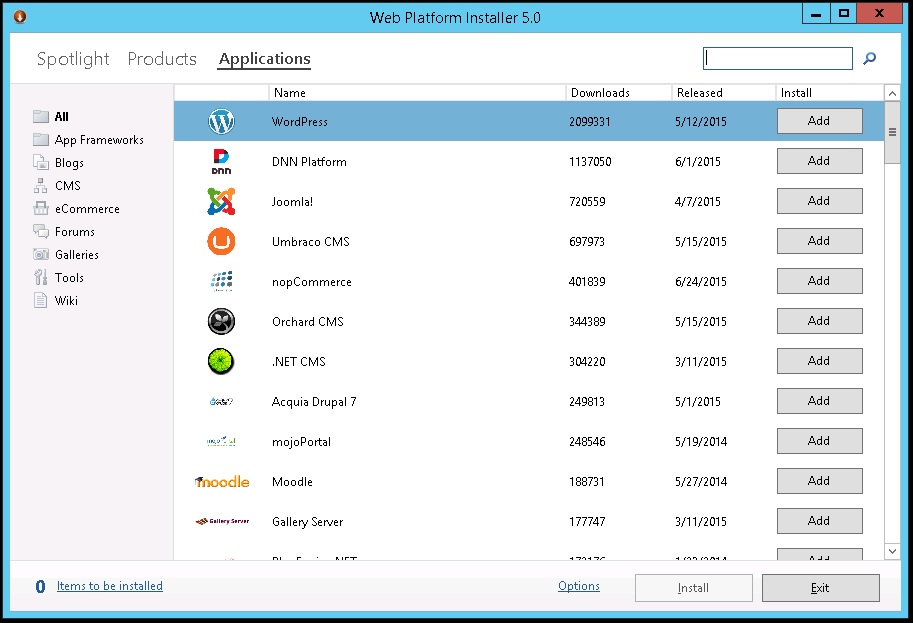
You download and run the Microsoft Web Platform Installer wpilauncher.exe file. Then click on Applications link on the top of the page and then select WordPress and click the Install button. First download and run the Microsoft Web Platform Installer wpilauncher.exe file. Second select Applications link at the top. Third select wordpress by clicking ‘Add’ […]
A client of ours running a Windows 2012 R2 remote desktop, terminal server was having issues where when they typed on their local keyboard it will show up on the server as alternating capital and lowercase letters like this “RiPtIdE hOsTiNg”. SOLUTION is to change the RDP settings on the client The solution in his […]
REDIRECTION OF PRINTERS / HARD DRIVES / CLIPBOARD FROM YOUR LAPTOP OR DESKTOP On client laptop/desktop prior to connecting to server: Local Printing (and redirection of DVD drive, local hard drive, enable copy and paste between client an server, etc.)— When you open the Remote Desktop Connection program on your local laptop/desktop, before pressing “Connect”, click on “Show […]
Use the steps below to schedule a task which can automatically reboot your Windows 2008 R2 server on a recurring basis. Please beware that users that are logged on will be kicked off when the server reboots. Go to administrative tools, task scheduler. Then right click on Task Scheduler and select Create Task Name the task, possibly something […]
Riptide Hosting offers the following backup options for Dedicated servers and Remote Desktop RDP hosted servers. BACKUPS IN OUR VM ENVIRONMENT for Virtual Servers VMs VEEAM: In our virtual server environment, we offer and recommend using Veeam backup which provides full server image backup. The backup can be restored on a different host/server if needed. […]
Vipre firewall settings to allow RDP remote desktop connection to your virtual server. You will need to login to the server via a Console or remote KVM/IP card to install and configure the firewall. If you install the firewall when you are logged in via a RDP remote desktop connection you will lock yourself out […]